
UC Berkeley Lunch Poems
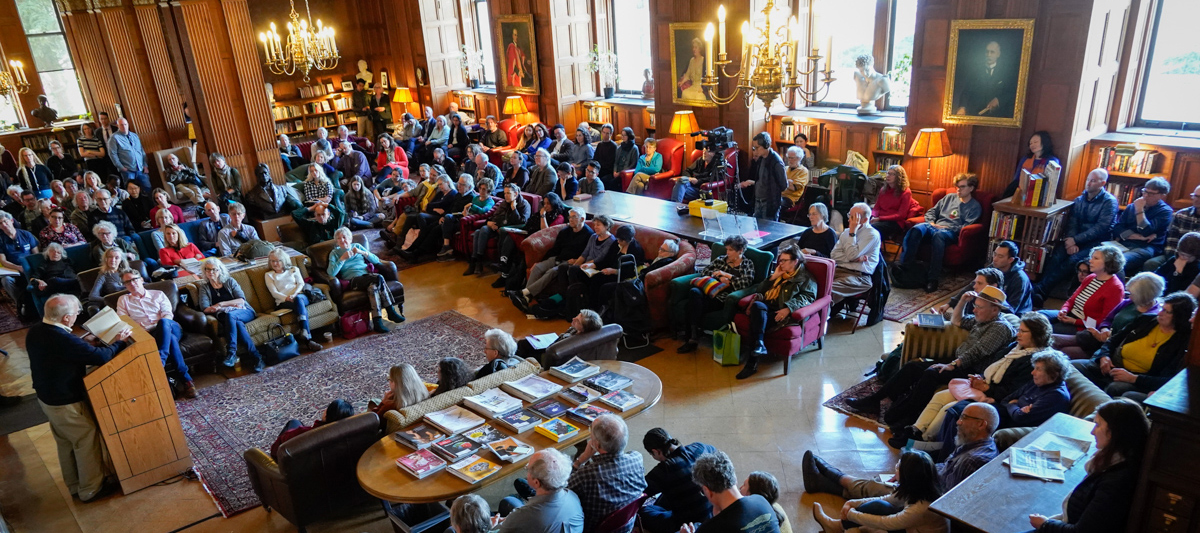
Lunch Poems, Berkeley’s storied noontime poetry series, is held in Morrison Library (inside Doe Library). The series is free and open to all audiences.
- All readings from 12:10 to 12:50 p.m.
- Event contact: poems-library@berkeley.edu
- Past readings are posted to YouTube
Juliana Spahr
Nov. 6, 2025

Juliana Spahr’s most recent book of poems is Ars Poeticas (Wesleyan University Press, 2025). Crowd Control, written with Claire Grossman and Stephanie Young, is forthcoming from Columbia University Press. Her many books of poetry include This Connection of Everyone with Lungs (University of California Press, 2005), Well Then There Now (Black Sparrow, 2011), and That Winter the Wolf Came (Commune Editions, 2015). Her books of criticism and theory include Du Bois’s Telegram: Literary Resistance and State Containment (Harvard University Press, 2018) and Everybody’s Autonomy: Connective Reading and Collective Identity (University of Alabama Press, 2001). She teaches at Mills College in Oakland.
Connie Mae Oliver
Dec. 4, 2025

Connie Mae Oliver is the author of the poetry collections dormilona (Burrow Press, 2025), Science Fiction Fiction (Spuyten Duyvil, 2020), and Cosmos a Personal Voyage by Carl Sagan Ann Druyan Steven Soter and Me (Operating System, 2017). Her work has appeared in Denver Quarterly, The Brooklyn Rail, Columbia Journal, KALW’s Bay Poets, and the Chicago Review of Books. She holds an M.F.A. in poetry from CUNY Brooklyn College and teaches literature and creative writing in Oakland. Her first novel, Close Encounters, is forthcoming in 2028 from Texas Review Press’ Innovative Prose series.
Aracelis Girmay
Feb. 5, 2026

Aracelis Girmay is a poet who makes works across genres. She is the author of four full-length poetry collections, including the recently published GREEN OF ALL HEADS (BOA, 2025). For her work, she received a Whiting Award and was named a finalist for the Neustadt International Prize for Literature. Other work includes the chapbook and was a flower, made in collaboration with book artist Valentina Améstica, as well as picture books for children. Recent texts (poetry and prose) have appeared in Astra, e-flux, The Paris Review online, Periphery Journal, and The Yale Review. Girmay is the editor of How to Carry Water: Selected Poems of Lucille Clifton (BOA, 2020) and So We Can Know: Writers of Color on Pregnancy, Loss, Abortion, and Birth (Haymarket Books, 2023). She is on the editorial board of the African Poetry Book Fund and teaches at Stanford University.
Cindy Juyoung Ok
March 5, 2026

Cindy Juyoung Ok is the author of Ward Toward (Yale University Press, 2024), a finalist for prizes from the Los Angeles Times and the National Book Critics Circle, and the winner of the Yale Younger Poets Prize, a Balcones Prize, and a California Book Award. She is also the translator of The Hell of That Star by Kim Hyesoon, forthcoming from Wesleyan University Press. A MacDowell fellow, Forward Prize winner, and Poetry Society of America Lucille Medwick Memorial Award recipient, Ok is a former physics teacher and currently serves as an assistant professor of English at UC Davis and a visiting faculty member in the Randolph College low-residency M.F.A. program.
Tonya Foster
April 2, 2026

Poet, essayist, and Black womanist scholar, Tonya M. Foster is the author of A Swarm of Bees in High Court (Belladonna*, 2015) and the bilingual chapbook La Grammaire des Os (Joca Seria, 2016), as well as a co-editor of Third Mind: Creative Writing Through Visual Art (Teachers & Writers Collaborative, 2002). Forthcoming publications include Thingifications : : A Mathematics of Chaos (Ugly Duckling Presse); Umbra Galaxy, Umbra Reader, a two-volume compendium on the Umbra Writers Workshop (Wesleyan University Press); and an anthology of experimental creative drafts (Nightboat Books). The 2023 recipient of the C.D. Wright Award for Poetry from the Foundation for Contemporary Arts, Foster holds the George and Judy Marcus Endowed Chair in Poetry at San Francisco State University. Eldest of four daughters, she is New Orleans-raised by New Orleanians who were themselves raised by New Orleanians in that south of the south fabrication caught among the Mississippi River, Lake Pontchartrain, and the Gulf of Mexico. She lives in an artist co-op.
Brandon Brown
May 7, 2026

Brandon Brown is the author of several books, including, most recently, Work (Atelos, 2020) and The Four Seasons (Wonder, 2018). In 2024, Free Poetry published his translation of the extant works of the troubadour Raimbaut d’Aurenga, Joy Is My Hotel. Brown’s writing on art and culture has appeared in Art in America, Frieze, The Believer, and Fanzine, among other publications. He received the Toni Beauchamp Prize in Critical Art Writing in 2018 and a National Endowment for the Arts fellowship in poetry in 2015. He is a co-editor at Krupskaya Books and occasionally publishes the zine Panda’s Friend. He lives in Richmond, California.
If you require accommodations to participate in this event, please contact Coordinator Violet Spurlock at poems-library@berkeley.edu or 619-708-2181 at least 7-10 days in advance of the event.
The Lunch Poems series, founded by Professor Robert Hass, is supported by Dr. and Mrs. Tom Colby, the UC Berkeley Library, the Morrison Library Fund, the UC Berkeley English Department, and the Deans’ Office of the College of Letters & Science. For more information or to be added to the Lunch Poems mailing list, please email poems-library@berkeley.edu or follow @PoemsLunch on Instagram and X.